
Tour: one decision cycle
The concepts pages describe the parts. This page follows one decision through all five phases of a Decision Value Loop, in the order a user meets them on screen: Sense → Analyze → Decide → Act → Learn.
The decision we follow is a Bid Response: should we respond to the inbound RFP, and with what offer? It is a good decision to tour because it has the shape most operators recognize: it recurs, it has an owner, it consumes a capacity that is finite (there are only so many bids a team can pursue well), and its outcome is measurable after the fact.
One thing to know before the tour. The loop shown here is mid-cycle: two phases complete, one being decided right now, two still waiting on that call. That is the state you will usually find your own decisions in, and it is the state that shows where the work is.
Opening the decision
A decision opens in the decision workspace as one page with two panes.
- The header names the decision and states the question it exists to answer: here, “Should we respond to the inbound RFP, and with what offer?” The question is part of the record, not a title someone typed.
- The left pane is the lifecycle rail: the five phases as rows, each showing its own state (complete, active, or pending).
- The right pane is the panel for whichever phase is selected. Every phase panel has the same four things: a state badge, a one-line summary of what the phase is doing, a grid of metric cards, and a table of the materials that phase produced or consumed.
- The page opens on the active phase: for this decision, Decide. You land where the work is.
[Screenshot: the Bid Response decision as it opens, lifecycle rail on the left, active phase panel on the right.]
For the tour, read the rail top to bottom rather than starting where the page opens. Clicking a phase row swaps the right pane to that phase.
[Screenshot: the lifecycle rail: two phases complete, one active, two pending.]
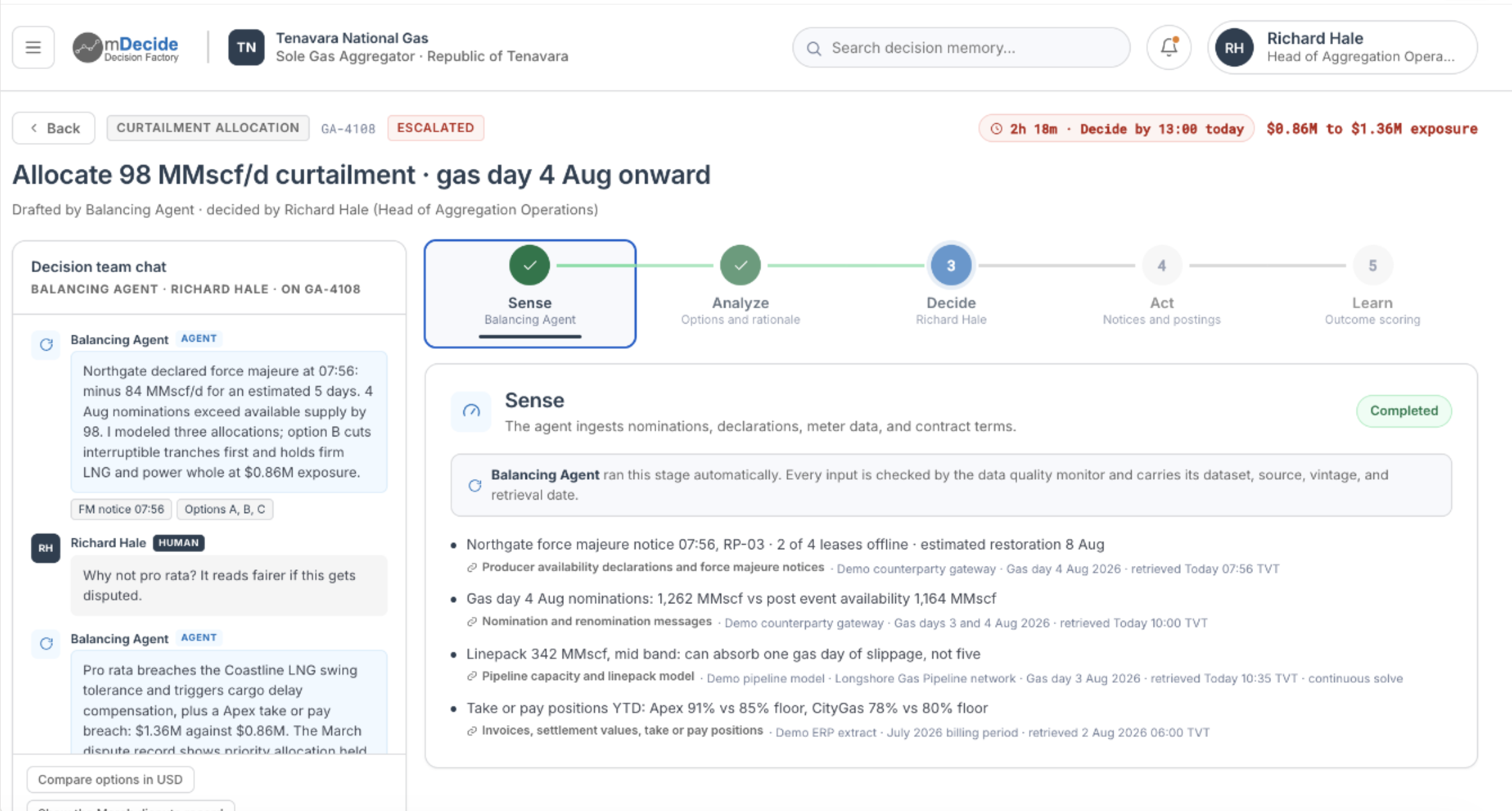
Sense: the loop notices something
What the phase is for. Sense consumes signals and turns them into Decision Materials: the evidence the rest of the cycle reasons over.
What the panel shows. The summary records that the inbound RFP was detected and triaged, with scope, deadline, and incumbent signals captured from intake. The metric cards carry the stakes:
| Metric | Value |
|---|---|
| Signals captured | 12 |
| Days to deadline | 18 |
| Estimated contract value | $2.4M |
The materials table lists three inputs, each with a type and a status: RFP packet (Document, Ingested), Buyer profile (Brief, Ingested), Incumbent scan (Signal, Captured).
What to read from it. The cycle started itself from an inbound signal: nobody keyed in a request to begin. The stakes and the deadline are values on the decision record rather than context living in one person’s head, which means the next person to open this decision sees the same numbers. And the materials already carry a status, so you can see that the gather work is done.
Analyze: options get modeled
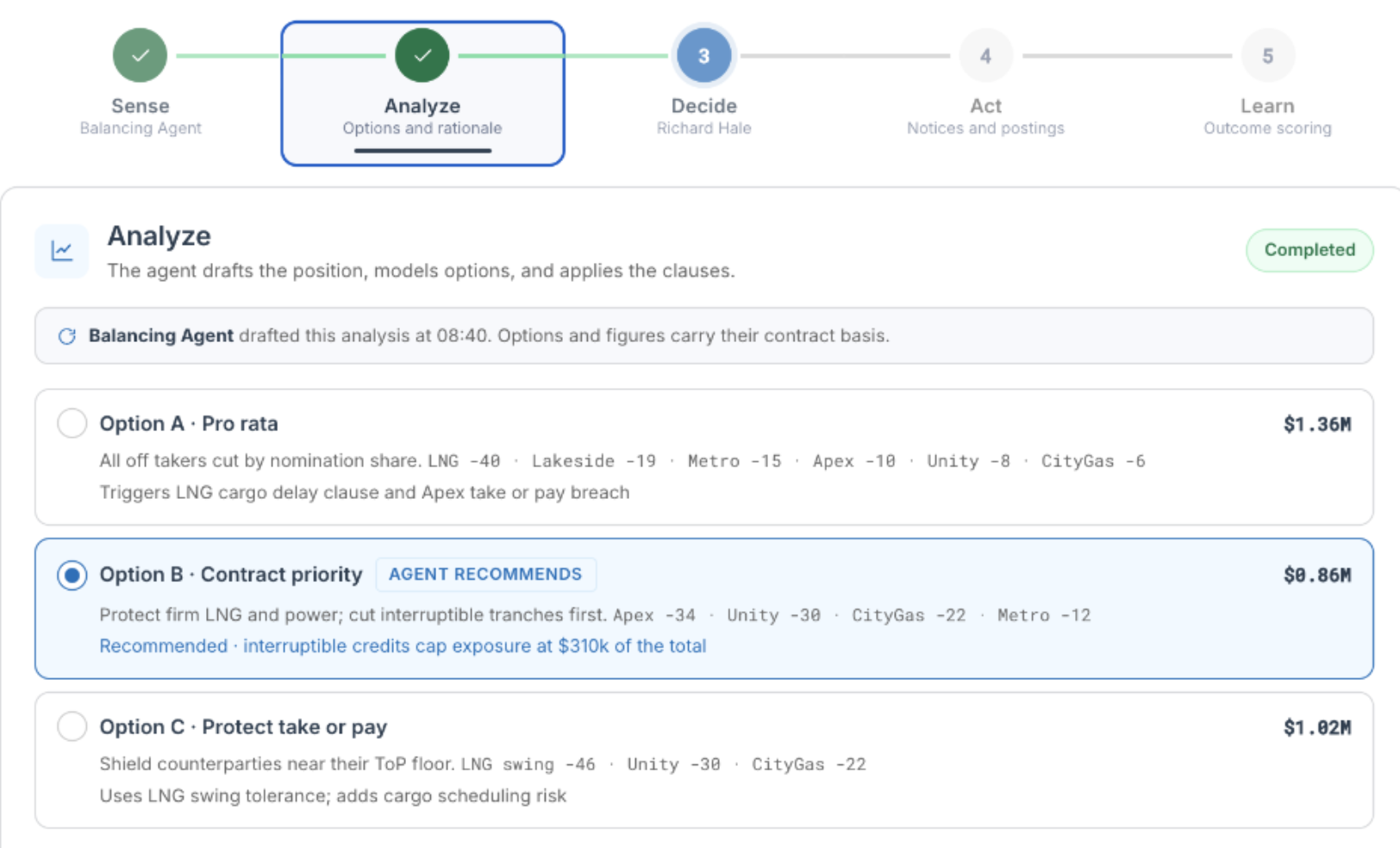
What the phase is for. Analyze consumes the Sense materials and produces alternatives with projections: not an answer, but a framed set of choices with their consequences estimated.
What the panel shows. The summary records that win probability and fit were assessed against capability and pricing models, and that two response options were modeled with downside bounds.
| Metric | Value |
|---|---|
| Win probability | 46% |
| Capability fit | Strong |
| Options modeled | 2 |
Materials: Win/loss model (Analysis, Complete), Pricing scenarios (Analysis, Complete), Capability matrix (Assessment, Complete).
What to read from it. This is the analytical core of the cycle, and the tension in it is visible on one screen: a middling 46% win probability sitting next to a strong capability read. That combination is the kind of call a person should make, with the analysis in front of them rather than reconstructed from memory. “Options modeled: 2” shows that the loop framed alternatives instead of returning a yes or a no.
Each analysis is a material you can open, and each material carries its own lineage: which data it drew on, which agent produced it, and what review it received. See Evidence, lineage, and outcome attribution for how that chain is recorded.
Decide: the recommendation waits for a person
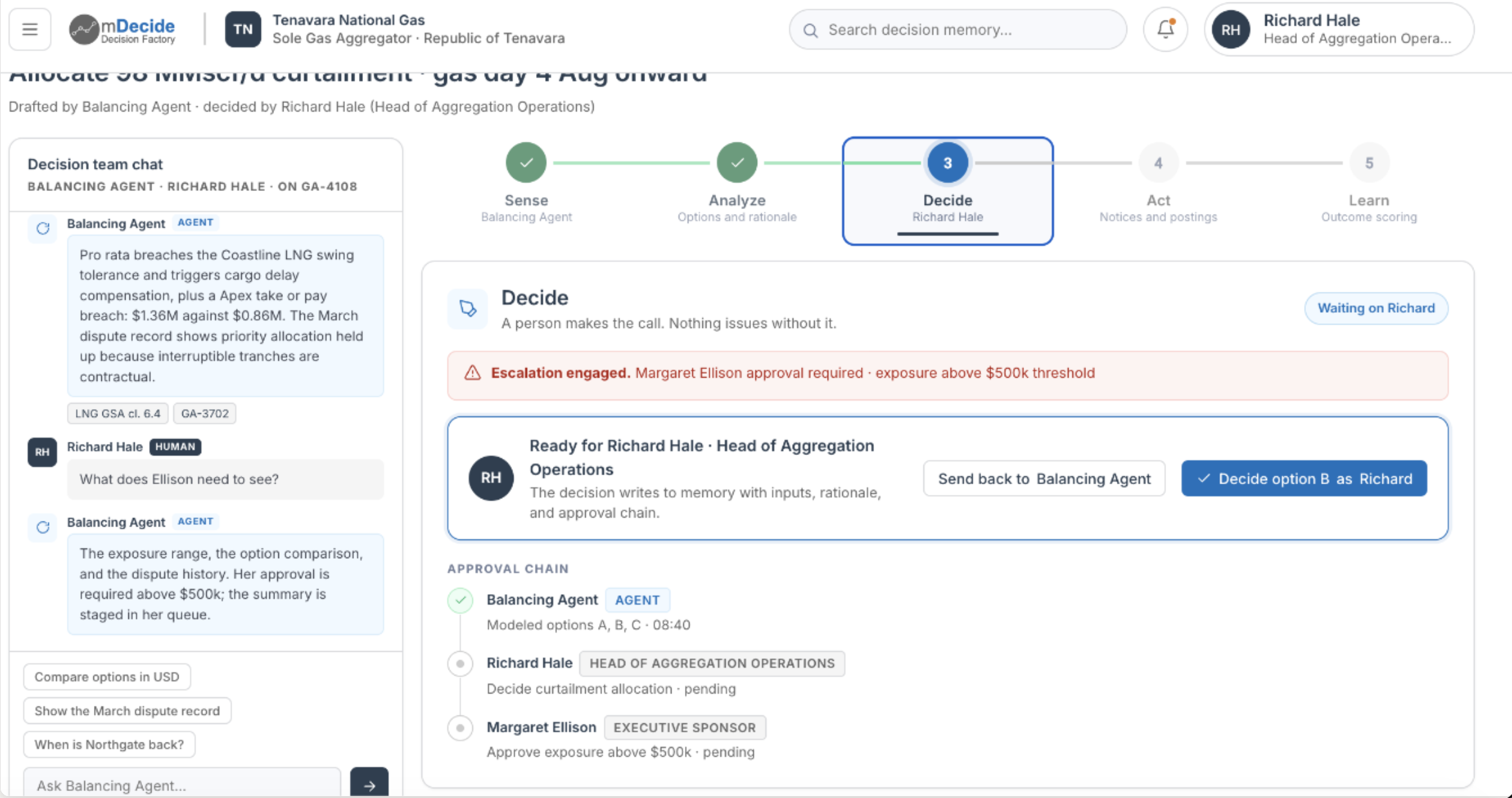
What the phase is for. Decide consumes the alternatives and produces the Decision record: the option selected, the outcome expected of it, the rationale, and who decided.
What the panel shows. The summary records the choice under consideration (a full bid versus a no-bid) with decision criteria and thresholds set, awaiting sign-off on the recommended option.
| Metric | Value |
|---|---|
| Recommended option | Full bid |
| Decision criteria met | 4 / 5 |
| Approval status | Pending |
Materials: Decision brief (Recommendation, In review), Bid/no-bid criteria (Rubric, Set).
What to read from it. This is the live decision moment, and it is where mDecide’s division of labor is easiest to see. The loop has produced a concrete recommendation (full bid) and shown its work against an explicit rubric, four of five criteria met. And it is holding at Pending. The agents recommend; the person decides.
The rubric matters as much as the recommendation. Because the criteria are written down before the call rather than reconstructed after it, a reviewer can see which criterion was missed and weigh it, instead of arguing with a score. In mDecide’s decision model the approval becomes part of the record too: the approver, the timestamp, and any conditions attached to the approval travel with the decision from here on.
Act: nothing runs ahead of the decision
What the phase is for. Act is where an approved decision becomes dispatched work, with each piece of that work tracked from dispatch through to completion.
What the panel shows. The summary records that on approval the bid response will be assembled and submitted, and that this has not started because it is gated on Decide sign-off.
| Metric | Value |
|---|---|
| Deliverables | 0 / 6 |
| Submission status | Not started |
Materials: Proposal draft (Deliverable, Pending), Pricing sheet (Deliverable, Pending).
What to read from it. Act is deliberately empty, and that is the most useful thing on the screen. Zero of six deliverables, nothing submitted, because the decision has not been approved yet. The loop does not show progress it has not made, and it does not let execution run ahead of the call authorizing it. Read alongside Decide’s pending approval, these are the same fact seen from two phases.
The two pending materials name what the bid will be built from once the gate opens, so you can see the shape of the work that is waiting, not just that something is waiting.
[Screenshot: the Act phase panel, gated on approval, with zero of six deliverables started.]
Learn: where the loop earns its name
What the phase is for. Learn consumes the observed outcome and records it against what the decision expected: the variance, what explains it, and what it implies for the next pass.
What the panel shows. The summary records that win/loss learnings will be captured once the outcome is known, pending the Act phase.
| Metric | Value |
|---|---|
| Learnings captured | 0 |
| Outcome | Unknown |
Materials: Retrospective (Review, Pending).
What to read from it. Outcome is Unknown and learnings are zero, because the bid has not been submitted, won, or lost. The slot exists before there is anything to put in it. The retrospective is not an optional write-up someone might get to; it is a material the cycle is already holding a place for.
This is also the phase that makes the loop a loop. The observed outcome is recorded against the outcome the decision expected, so the gap between them becomes a fact on the record rather than a matter of recollection. That record is what the next cycle’s Sense phase reads: which signals turned out to matter, which models proved reliable, which criteria in the rubric predicted the result. Each turn deposits a record; the accumulated records shape the next turn.
[Screenshot: the Learn phase panel, the retrospective slot, waiting for an outcome.]
Reading the decision’s state at a glance
Each phase panel carries a decision-state badge, and for this decision it reads in-progress. How to read the badge:
- The badge describes the whole decision, not the phase you happen to be looking at. It stays on in-progress as you click between Sense, Analyze, Decide, Act, and Learn.
- It reflects real posture rather than decoration. This decision is actively being made and not yet decided, which is consistent with Decide being the active phase. Once the Decide gate is signed off and approval moves off Pending, the decision advances to a decided posture and Act becomes the active phase.
This decision is one approval away from its next state, and both the badge and the rail say so.
[Screenshot: the decision-state badge reading in-progress.]
What one turn of the loop leaves behind
Read the rail back to the top and the whole cycle reads in one sentence: two phases done, one being decided right now, two waiting on the call. One decision, mid-cycle.
What that turn leaves behind is a record with a particular shape:
- Materials with lineage. Every input, analysis, and deliverable is a material with a type, a status, and a recorded provenance.
- A decision with its reasoning attached. The selected option, the expected outcome, the rationale, the rubric it was judged against, and who approved it.
- The work that followed. The deliverables and dispatched actions tied back to the decision that authorized them.
- The outcome, once it is known. Measured against what was expected, so the variance is inspectable.
Notice too that material statuses mature across the phases: inputs are Ingested or Captured in Sense, analyses read Complete in Analyze, the decision brief sits In review in Decide, and the customer-facing deliverables are Pending in Act. Watching that status column advance is watching the loop turn.
About this tour
The Bid Response loop used here is a worked example. The screenshots come from a demo environment and show a second decision, a gas-curtailment allocation, at the same mid-cycle point; the surfaces are the same. Your deployment’s Decision Value Loops are configured around your own recurring decisions. Their phases, metrics, materials, and criteria are yours. The five-phase shape, the gating behavior, and the record each cycle leaves behind are the same throughout the platform.
Where to go next
- Decisions and Decision Value Loops: the vocabulary behind the five phases.
- Evidence, lineage, and outcome attribution: how a material’s provenance is recorded and how outcome value attributes back to it.
- Decision Packs: how a loop like this one is configured for a decision class.
- Architecture overview: where the platform runs and how a deployment is isolated.