
Decision Packs
A Decision Pack is an industry decision workflow delivered as packaged, versioned configuration. It is how a Decision Value Loop becomes something a deployment can run.
The point of packaging is that you start with the work instead of building from nothing. A loop definition on its own does not say which agents run in which phase, which systems to connect, what a good alternative looks like in your industry, or how the evidence should appear on screen. A pack supplies all of that as one deployable unit: installed into a deployment, configured for your organization, and versioned so you know exactly what you are running.
What a pack contains
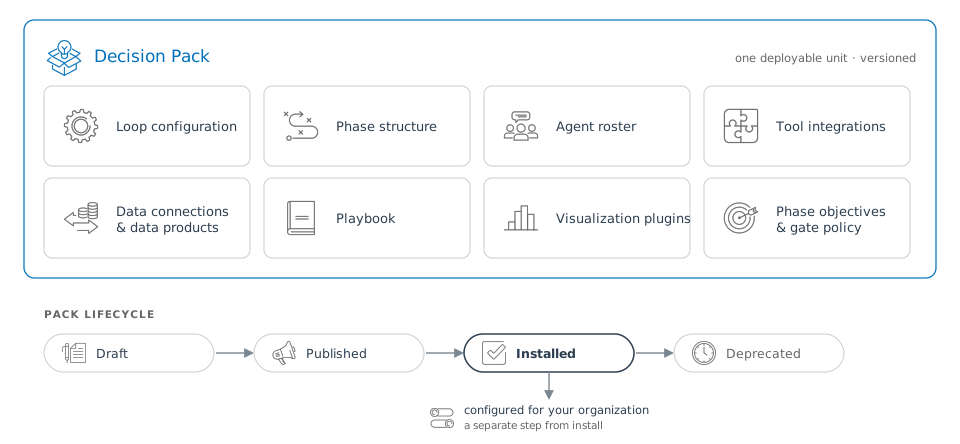
| Element | What it supplies |
|---|---|
| Loop configuration | The decision type the pack serves, what to sense, how alternatives are evaluated, when outcomes become measurable and what variance is tolerable |
| Phase structure | Which phases the loop runs, in what order, and which kind of work happens in each |
| Agent roster | The agent definitions that run in each phase, with their constraints and the tools they may use |
| Tool integrations | The configured connections those agents draw on |
| Data connections and data products | The connected data sources the loop reads, and the data product definitions that shape raw source data into what a decision can use |
| Playbook | The read-only process definitions, standard operating procedures, domain reference material, and decision criteria that agents consult while working |
| Visualization plugins | How the pack’s data products are rendered on the screens where people watch the work and make the call |
| Phase objectives and gate policy | What each phase must produce before the cycle can advance, and who must approve |
Two of these deserve a closer look, because they are the parts a customer most often wants to extend.
The playbook
A playbook is a versioned repository of process knowledge: how work proceeds inside a phase, which procedures apply, what domain-specific rules and reference data are in force, and the order in which agents take up the work. It is read-only while a cycle runs, so every cycle of a given workflow consults the same canonical procedures rather than knowledge buried in an agent’s prompt.
Playbooks have their own version lifecycle and their own identity. One playbook can be shared across several workflows, and one workflow can draw on several playbooks: a domain-knowledge playbook and a materials-production playbook, for instance.
Visualization plugins
A pack ships the plugins that render its data on screen. Reaching a screen does not require a front-end release:
- A new data product on an existing plugin is a runtime choice. The product declares how it wants to be drawn, and the matching plugin draws it. Even a new chart is data, not code.
- A new plugin is authored once (alongside a pack, or by you) and then installed into a running deployment, registered by name and loaded at run time. Authoring a plugin is engineering work; putting it in front of users is an install.
Data products and plugins covers this in full.
Pack lifecycle
A pack moves through four states: draft while it is being authored, published when it is released as a version, installed once it is deployed into a specific environment, and deprecated when it is superseded.
Installation and configuration are separate steps. Installing a pack brings its agents, tools, data product definitions, playbook, and plugins into a deployment. Configuring it binds the pack to your reality: which of your systems each connected data source points at, which thresholds and criteria apply, who approves at which gate, which of your people hold which authority.
Versioning matters more than it might appear. Because a pack is versioned, the record of every decision made under it can name the exact configuration that produced it, which is what makes a decision from eighteen months ago explainable rather than merely archived.
Packs available today
mDecide ships pre-configured packs for well intervention, pipeline integrity, manufacturing changeover, batch release, covenant monitoring, customer account intelligence, and scene triage. Each arrives with its integrations, its shared business vocabulary, and its decision structure already wired.
Pack coverage is expanding; the what’s coming page carries the current picture.
What you can change without a platform release
A pack is a starting configuration. Several extension points are designed to be exercised by a customer or a forward-deployed engineer rather than by the platform team:
- Connected data sources point at your systems. A source names a connection and carries how to reach it; the queries live in the data product definitions that draw on it.
- Data product definitions are authored. If a decision needs a shape of data the pack did not anticipate, the definition is where that is expressed.
- Phase objectives declare the roles a phase expects its evidence to fill. That vocabulary is configuration you edit, not platform code: a new regulatory regime adds its own roles without waiting for a release.
- Plugins install into a running deployment, as above.
- Playbook content is authored against the palette the pack provides: the data product definitions, the plugins, and the flows available to compose into a phase.
- Your own agents can join through open standards. See agents and runtimes.
Where to go next
- Data products and plugins: how the data a pack defines becomes evidence and reaches the screen.
- Workstreams and phases: how the work a pack configures is executed.
- Adopting mDecide: what selecting and configuring a pack looks like as an engagement.