
Adopting mDecide
Adoption is a staged progression rather than a single commitment. Each stage earns the next one, and what a stage proves carries forward without being rebuilt, because a pilot runs on the same platform that later runs production.
This page describes the shape of that progression and what your team does in the first weeks. It is written for evaluation: enough to plan against, without the operational detail your team receives once an engagement is under way.
The stages
| Stage | What happens | Typical duration |
|---|---|---|
| mPlan (optional starting point) | An assessment that produces an EBITDA-prioritized roadmap an investment committee can sign off on, before any build. | |
| mPilot | A proof of value on a single anchor decision. Connect read-only to real data, stand up the decision loop, and show that human + agent teams already do more than today’s rules-based systems, and that the agents learn. | Weeks |
| mLaunch | Production readiness. Extend to more decisions, run against live data, engage IT and security, validate against your own review frameworks, and build the production business case. | A few months |
| mOperate | Operate and scale in production. Continuous monitoring, optimization, and value tracking, with decision memory compounding across assets and teams. | Ongoing |
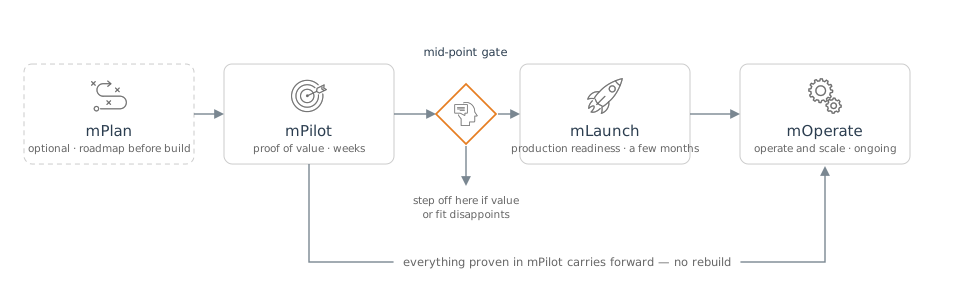
Not every customer starts at mPlan. Teams that already know which decision they want to prove start at mPilot; teams that need to defend a portfolio choice to an investment committee start at mPlan and arrive at mPilot with the anchor decision already chosen.
The gate between proof and production
Engagements are fixed price, so the investment is predictable and easy to plan around, and there are no surprise overages during a pilot. A mid-point gate sits between proof of value and production readiness: if value or fit disappoints, you can stop there. Otherwise the work continues without a gap and without a rebuild.
What your first weeks look like
The progression above is the commercial shape. Underneath it, the first weeks go to standing up a deployment that belongs to your engagement, wiring it to your identity provider, and running a first decision through the loop.
Kickoff: the specifics get fixed
A joint metricsIQ and customer team works through a short list of decisions at kickoff. The things your team is asked to bring:
- The anchor decision. One recurring, high-stakes decision worth putting through the loop, with a named business owner on your side.
- Read-only access to the systems behind it. The platform reads your data in place; there is no migration and no data-platform program to finish first.
- An identity provider and two groups. One group that maps to platform administrators, one that maps to platform users.
- One to three named administrators to seed into the admin group.
- Network requirements, if you have any: for example, IP allow-listing or VPN-only access.
- Data-access scope: which data products and integrations should be enabled for this engagement.
These are recorded once and become the reference for the engagement. Your team does not need to prepare anything technical in advance of this conversation.
Your deployment
mDecide ships as a dedicated single-tenant deployment: one environment per customer, with no data comingled across customers. Your deployment is isolated at three layers: a namespace that scopes every workstream, execution, agent, data product, and audit record to your engagement; a dedicated single-sign-on application that restricts access to your two groups; and dedicated infrastructure (database, object store, and secrets) in a cloud account allocated to your organization.
The region your deployment runs in is selected to suit your data-residency needs. See Architecture overview for the deployment shape and where exactly the tenancy boundary falls, and Trust and security for the isolation posture in detail.
Signing in
How your users sign in is a deployment-time choice, made with your team during scoping and configured when your instance is provisioned:
- Single sign-on through your identity provider. Okta, Entra ID, Google Workspace, and others. mDecide trusts your provider for identity and reads group membership to assign roles. No mDecide-specific passwords are issued, and group membership stays entirely on your side: to add or remove a user, you edit the group in your own directory and the change takes effect at their next sign-in. metricsIQ does not store or replicate your user lists. Most deployments run this mode.
- Local accounts. User accounts managed inside your mDecide instance, for organizations that prefer not to federate an identity provider. Password and session protections are described in Trust and security.
If your identity provider is one metricsIQ has not federated before, the engagement team runs a joint working session to configure the trust; expect that to add a small amount of time to the first week.
Two roles
| Capability | Platform User | Platform Admin |
|---|---|---|
| Create and run workstreams | Yes | Yes |
| View own executions | Yes | Yes |
| View other users’ executions in your tenant | Read-only | Yes |
| Export execution artifacts | Yes | Yes |
| Configure agents, tools, and integrations | No | Yes |
| Add or remove approved data products | No | Yes |
| Manage user group assignments | Handled in your identity provider | Handled in your identity provider |
Every action is scoped to your tenant. No user, including a Platform Admin, can see data, executions, or configuration belonging to any other customer. Audit-log access is granted separately rather than being bundled into the admin role, so that reading the audit trail is itself a deliberate, recorded choice.
The first decision cycle
Once sign-in works, the first run is short: create an execution from a workstream, supply inputs as the agents ask for them, and review the output with its provenance attached. See Tour: one decision cycle for a walkthrough of what that looks like in the product.
What you operate, and what metricsIQ operates
metricsIQ is the operator of record for the platform. Your team does not configure cloud infrastructure, manage backups or disaster recovery, patch servers or containers, manage TLS certificates, configure security groups, manage database instances, or administer the deployment pipeline.
What stays with you is the part only you can own: your users and their role assignments in your own directory, the accuracy and appropriateness of the data you put into the platform, and the business judgment at the human checkpoints in the loop. The full split is on Trust and security.
After go-live
Day-to-day operation is routine: users are added and removed in your own identity provider; issues are raised at mdecidesupport@metricsiq.ai and reach people who already know your environment, your decision packs, and your integrations; and under mOperate the deployment is monitored continuously, so many issues are found and resolved before they reach you.
Documentation for the release your deployment actually runs is available inside the platform once you are live, alongside decision-pack runbooks and role-based training for the people working with the agents.
Next
- What’s coming: directions under consideration, with no dates promised.
- FAQ: the questions that come up most often during evaluation.